
Ask a recruitment CRM vendor what appears on the role view and you will get a variant of the same answer: a job record, a candidate pipeline, the client contact, and a notes tab. Ask a consultant running an active mandate what they need to see on the role and the answer is different. It is the mandate: everything the agency knows about this specific search that matters to closing it. This article walks through the ten categories of information a modern recruitment CRM actually owes a consultant running a mandate in 2026, introduces the Signals-coined framework of Everything on a Role, and audits how the current recruitment CRM market performs against it using each vendor’s own product documentation. Half the framework is not a product feature at all: it is already a regulatory obligation under UK law, meaning any recruitment CRM operating in UK-relevant markets must hold it or expose its clients to compliance risk. The other half is what separates a CRM that carries the context from a CRM that expects the consultant to carry it themselves.
The gap between the demo view and the working reality
Every recruitment CRM demo opens with the same view. A job title, a client company, a JD field, a pipeline of candidates in stages. It is a tidy picture. It is also, for a consultant running a live search, the least interesting picture on the platform.
The working reality of a mandate is different. The consultant needs to know that this client took eight weeks to give feedback on the last shortlist, that the hiring manager mentioned a competing candidate on the last call, that the candidate on stage three has a competing offer from a specific competitor, that the salary band was quietly widened after 60 days of no successful hire, that the referee call is still pending, and that the fee agreement carries a 20 per cent discount if the placement is made inside 30 days. None of that appears on the demo view. All of it appears in tabs, subforms, calendar entries, email threads, and increasingly WhatsApp conversations that never reach the CRM at all.
The evidence that consultants routinely work outside the CRM to reconstruct this picture is now well documented. Aptitude Research’s 2026 recruiter-experience research found that 61 per cent of recruiters name poor integration as their single biggest frustration with recruiting technology, 57 per cent say they leave their ATS just to complete sourcing, and only 18 per cent say their technology supports the way they actually work Source: Aptitude Research, May 2026. Employ’s 2025 Recruiter Nation Report found that 79 per cent of teams still rely on spreadsheets to manage reporting, and that recruiter stacks routinely include a separate CRM (47 per cent), background checks (67 per cent), recruitment marketing (58 per cent), video interviewing (51 per cent), and scheduling software (49 per cent) alongside the ATS Source: Employ 2025 Recruiter Nation Report. Atlas’s 2026 agency benchmark found that 56 per cent of respondents describe their current recruitment technology setup as ‘functional but fragmented’ Source: Atlas 2026 Benchmark Report. The consultant reconstructing a full mandate picture from a fragmented stack is not an edge case; it is the median.
The Ten Categories of Everything on a Role
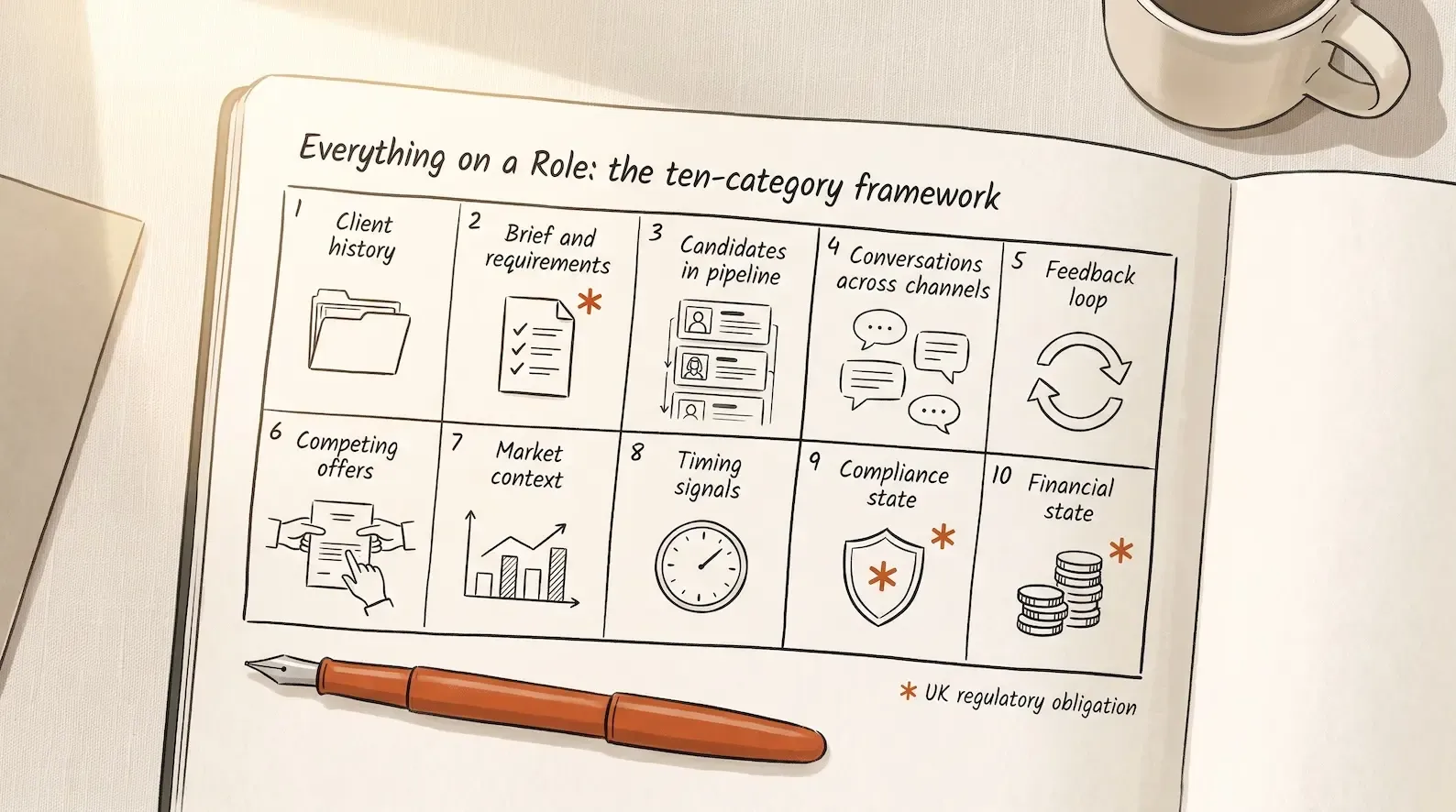
The Signals-coined framework, introduced here, is a specific answer to the question ‘what should a recruitment CRM actually hold on a role for a consultant running the mandate?’ It has ten categories, each corroborated where independent research supports the category and explicitly labelled as Signals’ own framing where it does not.
1. Client history. Past roles worked with this client, past placements made, past disputes, past terms of business, past effective-cause chains where an introduction later paid out. This is not just useful context; it is required record-keeping. The UK Conduct of Employment Agencies and Employment Businesses Regulations 2003 require agencies to retain records for at least one year from creation and to be able to produce them within two business days of a request Source: Conduct Regulations reg. 29. Fee-dispute law turns on introduction history under the effective-cause principle.
2. Brief and requirements. The initial brief, subsequent updates, must-haves versus nice-to-haves explicitly separated, salary range, benefits, timeline, and interview stages. This is regulatorily mandated: regulation 18 of the Conduct Regulations requires the agency to obtain sufficient information from the hirer before any introduction, and Schedule 5 specifies the particulars that must be recorded Source: reg. 18; Source: Schedule 5. LinkedIn Talent Solutions’ intake meeting checklist adds practitioner detail: business need, target titles, example profiles, priority level, decision-round timing, feedback cadence and SLAs, interview team Source: LinkedIn Intake Meeting Checklist.
3. Candidates in pipeline. Every candidate on this mandate, their current stage, feedback so far, next action required, and days-in-stage. Bullhorn’s 2026 GRID report finds that 72 per cent of firms that submit multiple candidates to a position report time-to-place under 20 days Source: Bullhorn GRID 2026. Pipeline visibility is the shortest path between shortlist quality and time-to-fill.
4. Conversations across channels. Every relevant email, call, LinkedIn message, WhatsApp thread, WeChat exchange, and meeting note related to this mandate, consolidated on the role record itself. This is where the fragmentation problem bites hardest: Employ’s data on recruiter stacks shows how many tools sit between a recruiter and a complete conversation history, and the six channel classes a recruitment CRM needs to capture argument goes into the mechanics.
5. Feedback loop. Client feedback per candidate and candidate feedback about the client, both stored per person and per stage. Candidate-side feedback has strong corroboration: Survale’s 2025 Candidate Experience benchmark found that 56 per cent of candidates received no feedback after rejection Source: Survale 2025 CandE Benchmark, and Bullhorn’s 2025 Talent Trends coverage reported that 72 per cent of professionals stopped working with a recruiter due to lack of communication and slow responsiveness.
6. Competing offers and candidate motivations. Known other offers each candidate is working, and stated decision drivers. Gartner’s June 2025 research found that 44 per cent of prospective candidates received multiple job offers in their most recent hiring process, with 53 per cent citing compensation as the main decision driver and 47 per cent citing career growth Source: Gartner, June 2025. Robert Half’s 2026 data adds that 85 per cent of employers have extended a counteroffer, and 32 per cent of counter-accepters left within 12 months anyway. A mandate without the competing-offer picture is a mandate that will lose the placement to a competitor whose consultant asked the right question.
7. Market context. Comparable roles at other companies, competing companies also hiring, salary benchmarks specific to this mandate’s role type and geography. Salary movement is well-measured at market level: the KPMG and REC UK Report on Jobs August 2026 recorded starting-salary inflation at a six-month high Source: KPMG and REC, August 2026. Applying that market context to a specific mandate is where a CRM either helps or expects the consultant to check three external tools.
8. Timing signals. Client urgency indicators (a role open for 90 days, a hiring manager suddenly answering emails within an hour, a re-post signal) and candidate availability windows. Client-side timing has real evidence: a one per cent increase in the quits rate is associated with a 2.7-day reduction in Time to Hire per Indeed Hiring Lab Source: Indeed Hiring Lab, May 2025. The hiring-intent signal layer sits inside this category as an active detection surface, not a static field.
9. Compliance state. Right-to-work check status, IR35 status determination, references pending, licensing where applicable. This is the strongest-evidenced category in the whole framework. Home Office guidance mandates that a clear copy of each right-to-work document must be retained with the check date, and specifically notes that a check performed by a recruitment agency does not create a statutory excuse for the employer Source: Home Office employer’s guide, June 2025. HMRC’s IR35 rules require status determination statements to include the decision and the reasons, or liability shifts back to the client Source: HMRC GfC4 part 9. A CRM without compliance-state fields on the role is not a compliance-aware CRM.
10. Financial state. Fee agreed, terms of business referenced, invoicing status, and revenue attribution. Schedule 5 of the Conduct Regulations requires agencies to record dates of fee requests and receipts, plus copies of statements or invoices Source: Schedule 5. Audited public accounts confirm that placement, not invoicing, is the revenue-recognition trigger: ‘turnover arising from the placement of permanent candidates is recognised at the point in time the candidate commences full-time employment’ per Hays plc’s FY25 financial statements Source: Hays plc FY25 accounts.
Five of the ten categories (1, 2, 5 on the candidate side, 9, and 10) are already statutory or regulatorily-adjacent obligations under UK law. A recruitment CRM that does not hold them cleanly is not a completeness gap; it is a compliance exposure the agency inherits at every audit.
How current recruitment CRMs perform against the ten categories
Eight recruitment CRMs were reviewed against the framework using each vendor’s own current product documentation as of September 2026. What each ships directly on the role or job view varies significantly.
| Vendor | On the role view (per own docs) | Fragmented to elsewhere |
|---|---|---|
| Bullhorn | Overview / Edit / Files / Activity / Notes tabs; with Amplify AI edition adds pipeline visual and AI-generated Suggested Actions Source: Bullhorn KB, Amplify Tab | Submission tab, client and candidate as related records |
| Vincere | Detailed brief, status, client, forecasting fields on Job Profile Source: Vincere Help | Application Stage, pipeline views, Job Stats Dashboard sit adjacent, not on the profile |
| JobAdder | Quick-view popups, dashboards (vendor-reported) | Requisition-level notes are a distinct data location from the candidate profile |
| Recruit CRM | Candidate pipeline scrolls below job info Source: Recruit CRM Help | ’View All’ redirects to a separate screen for bulk actions and Kanban |
| Loxo | Job details, activity, candidates in one Job Pipeline | Internal notes on candidate cards are documented as not travelling with the candidate to other jobs by design |
| Recruiterflow | Job setup fields, hiring team, statuses, fill probability | Job view and Jobs-section dashboard don’t match (documented user complaint, September 2026) |
| Manatal | Nine explicit tabs: Candidates, Summary, Team, Recommendations, Activities, Notes, Attachments, Sourcing, Reports Source: Manatal Support | Recommendations settings sit outside the record |
| Mercury | Basic Info, Candidates, Activities & Description, Applicants, Custom Fields, Advert Status Source: Mercury KB | Staged fees on a separate Vacancy Related > Fees form; cross-role metrics on Consultant Dashboard |
Only three of the eight vendors (Bullhorn Amplify, Manatal AI Copilot, Recruiterflow AIRA) document AI that reads role-level state on the job view. Even those implementations are more limited than the marketing suggests: Bullhorn’s Amplify Summary Cards are the closest thing to an automatically-refreshing mandate summary, but its underlying AI Assistant reads the Job Description field specifically rather than the full mandate history Source: Bullhorn AI Assistant FAQ. Documented AI on the role across the industry in 2026 is overwhelmingly content generation (job ads, JDs, qualifying questions) or one-off candidate scoring, not persistent, always-current mandate briefing.
The three failure modes user reviews confirm
Review-platform evidence across seven of the eight vendors converges on three recurring failure modes, quoted verbatim from named reviewers on named platforms.
Failure mode one: click-depth to assemble a full role picture. ‘No simple way to view all CV sends interviews and other bits of pipeline all on one page. The Dashboards aren’t great’ (Alex L., Bullhorn user, Capterra, July 2023). ‘I am unable to easily see when first looking at the candidate profile which platform they applied to the ad, I need to dig to get the info’ (Kirsty V., JobAdder user, Capterra, January 2023). ‘When I open a job, I don’t see the same dashboard that appears in the Jobs section’ (Verified User, Recruiterflow, G2, September 2026).
Failure mode two: role context stored in the wrong record or not travelling. ‘If I add notes regarding my candidate from the requisition page, they won’t be shown in my candidate’s profile and won’t show up in the reports either’ (Paulina P., JobAdder user, G2, April 2023). Loxo’s own documentation states that internal notes on candidate cards are job-specific and ‘do not travel with the candidate to other jobs’ by design Source: Loxo Help. Recruiterflow users report that the job view and the Jobs-section dashboard show different data.
Failure mode three: persistent Excel and Outlook alongside the CRM. ‘Everything is clunky and because you have to constantly go out of the program to actually work, there is no continuity’ (Deb M., Loxo user, Capterra, October 2024). ‘My team often sends resumes and notes through Outlook instead of LOXO’ (Verified Reviewer, Managing Partner, Capterra, January 2026). ‘The reporting feature is also not as robust or clear to the point that I often end up pulling raw data and working it up in Excel instead’ (Kim B., Recruiterflow user, Capterra, September 2023). ‘In this section you cannot separate contract vs permanent deals; I haven’t used this area much and still use a spreadsheet for tracking opportunities’ (Nicky C., Recruit CRM director, Capterra, August 2025).
None of these are one-off complaints. Each is corroborated across multiple users on multiple platforms across multiple years.
What good looks like: the interface should carry the context
Nielsen Norman Group’s May 2025 piece on serial task switching states the design principle plainly: ‘Each time we switch tasks, the brain must reset and reacquire the context of the new task, which slows down productivity’, with the design implication that interfaces should ‘help by reducing the cost of jumping back and forth’ Source: Nielsen Norman Group, May 2025. This is the underlying argument for Everything on a Role. The interface should carry the context. If a consultant running a mandate has to hold half the mandate in their head or reconstruct it from ten tabs, the CRM has already lost.
For a recruitment CRM, carrying the context means three things. First, the role view has to consolidate the ten categories rather than distribute them across tabs, subforms, related records, and external tools. Second, the AI on the role view has to read the full mandate history (conversations, feedback, timing, motivations), not just the Job Description field. Third, the mandate view has to update itself continuously as new information arrives (a client emails, a candidate replies on WhatsApp, a competitor announces a hire), rather than sitting frozen until the consultant remembers to refresh it. This is the same architectural argument the Three Search Modes framework piece walked through for plain-English search: coverage of the underlying data is the ceiling on everything downstream.
What Signals owes a consultant running a mandate
Signals is designed around the Everything on a Role framework as a first-class product surface, not as a set of tabs to click through. The Perfect Memory pillar covers category 4 (conversations across channels) as an architectural condition rather than a feature: emails, calls, WhatsApp, WeChat, LinkedIn messages, and meetings all flow into the mandate record automatically, against the correct candidate, company, and job. Client Rooms hold the shared workspace between recruiter and client for every active search, which is where categories 1, 2, 3, and 5 (client history, brief, pipeline, feedback loop) live together instead of being spread across the CRM. The hiring-intent signal layer surfaces category 7 and category 8 (market context and timing signals) as active detection rather than static fields.
For the categories that are regulatory obligation rather than product feature (client history retention, brief and requirements record, compliance state, financial state), Signals holds the audit trail as structural properties of the record, so that the UK Conduct Regulations and IR35 obligations covered in the recruitment UK 2026 piece are met by architecture rather than by consultant discipline.
The result is a mandate view where the consultant sees the full picture the moment they open the role, without opening tabs, external tools, or spreadsheets. That is what a recruitment CRM actually owes a consultant running a mandate in 2026. For a wider frame on how to evaluate any AI-native recruitment CRM against this and other structural requirements, our recruitment CRM buyer’s guide for 2026 walks through the Five Dimensions of AI-Native Evaluation, of which mandate-view completeness is one.
See what everything on a role looks like when built as a first-class product surface
Signals is live for recruitment agencies globally. Book a demo to see the mandate view built for how a consultant actually works.
Common questions
Everything on a role means the ten categories of information a consultant running an active mandate should have consolidated on the role record itself, rather than scattered across tabs, external tools, or side systems. It is a Signals-coined framework for what a recruitment CRM actually owes a consultant working a live search, benchmarked against a mixture of UK regulatory obligation (client history, brief and requirements, compliance state, financial state) and commercial reality (conversations across channels, feedback, competing offers, timing signals, market context, pipeline state). A CRM that requires the consultant to open five tabs, three external tools, and a spreadsheet to assemble the working picture of a mandate has already lost, because it makes the consultant carry what the interface should carry.
The ten categories are: (1) Client history: past roles worked, past placements, past disputes. (2) Brief and requirements: initial brief, updates, must-haves versus nice-to-haves, salary range, timeline. (3) Candidates in pipeline: all statuses, feedback, next actions. (4) Conversations across channels: emails, calls, LinkedIn, WhatsApp, WeChat, meeting notes. (5) Feedback loop: client feedback per candidate, candidate feedback about client. (6) Competing offers and candidate motivations: known other opportunities and stated decision drivers. (7) Market context: comparable roles, competing companies hiring, salary benchmarks. (8) Timing signals: client urgency indicators, candidate availability windows. (9) Compliance state: right-to-work, IR35 status determination, references pending. (10) Financial state: fee agreed, invoicing status, revenue attribution.
Unevenly. Per each vendor's own current product documentation as of September 2026: Bullhorn documents Overview, Edit, Files, Activity, and Notes tabs on the job record; with the Amplify AI edition, an Amplify tab adds a pipeline visual and AI-generated Suggested Actions card [Source: Bullhorn KB, Amplify Tab](https://kb.bullhorn.com/amplify/Content/Amplify/Topics/amplifyTab.htm). Vincere puts brief, status, client, and forecasting fields on the Job Profile, but the pipeline sits adjacent, not on the profile [Source: Vincere Help](https://help.vincere.io/en/articles/3595103-job-profile-in-vincere). Manatal ships the clearest documented tab inventory: Candidates, Summary, Team, Recommendations, Activities, Notes, Attachments, Sourcing, and Reports [Source: Manatal Job Overview](https://support.manatal.com/docs/job-overview). Loxo documents that candidate notes on the job pipeline explicitly do not travel with the candidate to other jobs. Recruit CRM has no tabs, client panel, or activity log documented as appearing on the job record itself. Only three vendors (Bullhorn, Manatal, Recruiterflow) document AI that reads role-level state on the job view.
The UK Conduct of Employment Agencies and Employment Businesses Regulations 2003 already mandate the brief record: regulation 18 requires an agency to obtain sufficient information from the hirer before any introduction, including start date, duration, position, location, hours, required qualifications, minimum rate of remuneration, and notice periods [Source: Conduct Regulations reg. 18](https://www.legislation.gov.uk/uksi/2003/3319/regulation/18). Schedule 5 specifies the particulars that must be recorded per hirer application. Regulation 29 requires records to be retained for one year and producible within two business days of any request. Home Office right-to-work guidance mandates that a clear copy of each document must be retained with the check date, and critically, an agency check does not create a statutory excuse for the employer [Source: Home Office employer's guide, June 2025](https://www.gov.uk/government/publications/right-to-work-checks-employers-guide/employers-guide-to-right-to-work-checks-26-june-2025-accessible). HMRC's IR35 rules mandate that status determination statements include the decision and the reasons, or liability shifts back to the client [Source: HMRC GfC4 part 9](https://www.gov.uk/government/publications/help-to-comply-with-the-reformed-off-payroll-working-rules-ir35-gfc4/status-determination-statements-part-9). Five of the ten categories in the framework are therefore not vendor features but legal obligations.
User reviews across seven of the eight recruitment CRMs researched converge on three recurring failure modes. First, click-depth to assemble a full role picture: 'No simple way to view all CV sends interviews and other bits of pipeline all on one page' (Bullhorn user, Capterra), 'I am unable to easily see when first looking at the candidate profile which platform they applied to the ad, I need to dig to get the info' (JobAdder user, Capterra), 'When I open a job, I don't see the same dashboard that appears in the Jobs section' (Recruiterflow user, G2, September 2026). Second, role context stored in the wrong record or not travelling: 'If I add notes regarding my candidate from the requisition page, they won't be shown in my candidate's profile' (JobAdder user, G2); Loxo card notes are documented as not travelling with the candidate to other jobs by design. Third, persistent Excel and Outlook use alongside the CRM: 'My team often sends resumes and notes through Outlook instead of LOXO' (Loxo user, Capterra, January 2026), 'I still use a spreadsheet for tracking opportunities' (Recruit CRM user, Capterra, August 2025).